





JohnnyB
Members
-
Joined
-
Last visited
Never
Everything posted by JohnnyB
-
If you’re looking at a used BYD imported from another country, ask what the dealer can confirm for that specific car before you put down a deposit. The original market and the model year help you find the correct documents when the same badge is used in several countries. Here’s a short note you can send to a seller or the authorised workshop you’d use: Please confirm the vehicle’s original market, model year and exact version, and the date the warranty started. Could you share the service record and confirm what vehicle, traction battery and drive-unit cover remains for this VIN in my country? Please point me to the applicable written terms and any transfer or import conditions. Can your local workshop service this version and advise on app access, updates and parts support? If the answer is general, follow up for the applicable warranty document and written confirmation for the VIN. Ask which parts of the answer come from records the dealer has checked. For a public forum post, the original and destination countries, model and year are enough to explain the situation. Send the full VIN and vehicle documents privately to the dealer. The UK and Mexican BYD warranty pages are starting points for finding the local documents. For battery health, BYDbase has a separate overview of Blade Battery and what warranty thresholds tell you. BYD UK warranty information · BYD México warranty lookup · BYDbase Blade Battery overview. On this European ATTO 3 EVO, callout 2 shows where to look for the VIN at the base of the windscreen. Ask the dealer to confirm the vehicle’s original market and warranty separately. Credit: BYD. ATTO 3 EVO Owner’s Manual (English, European LHD, EN_V0 (03.2026), printed p. 237, PDF p. 238). Download on BYDbase. If you bought a used BYD from another country, what did the local dealer confirm in writing that helped you decide?
-
For a first winter trip in an electric BYD, pick a main charging stop and an earlier backup. Check that both have the right connector, are accessible when you expect to arrive and accept a payment method you can use. Look at the charging network’s live status before leaving and again at a safe stop. A quick estimate is enough to see whether the first leg needs a rethink. Multiply your distance by a conservative consumption estimate for that route. Divide by 100 if your estimate is in kWh per 100 km. Use the usable battery capacity for the percentage calculation. Worked example, using hypothetical figures. A car with 60 kWh usable starts at 90%, so it has about 54 kWh available. At 22 kWh/100 km, a 200 km leg uses 44 kWh and leaves about 17%. An earlier stop at 160 km uses about 35 kWh and leaves about 31%. If you want to arrive with 20% in this example, plan around the earlier stop. Recheck the estimate if wind, temperature or cruising speed differ from your assumptions. If your model supports traction-battery preheating, check its handbook before the first DC stop. The European ATTO 3 EVO technical sheet distinguishes cold-weather DC charging performance from the charger’s rating. A range display can also change with the selected estimation mode, as the HAN EV guide explains. BYD Europe ATTO 3 EVO specifications · BYDbase guide to the HAN EV range display. The ATTO 3 EVO’s Scheduled departure screen shows where to set the departure time. The manual describes preheating for a DC stop separately. Credit: BYD. ATTO 3 EVO Owner’s Manual (English, European LHD, EN_V0 (03.2026), printed p. 92, PDF p. 93). Download on BYDbase. What arrival reserve has worked for you on a cold motorway trip, and what were the car, temperature and cruising speed?
-
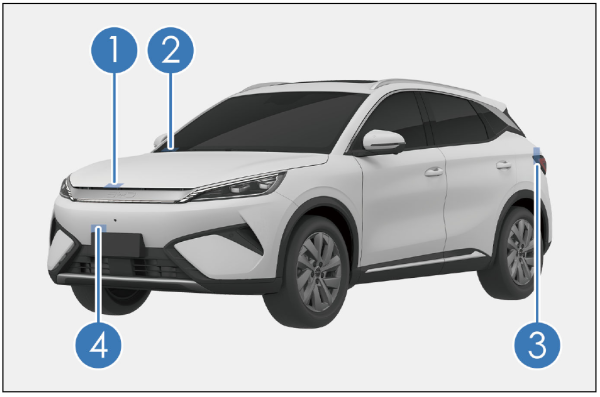 On this European ATTO 3 EVO, callout 2 shows where to look for the VIN at the base of the windscreen. Ask the dealer to confirm the vehicle’s original market and warranty separately. Credit: BYD. ATTO 3 EVO Owner’s Manual (English, European LHD, EN_V0 (03.2026), printed p. 237, PDF p. 238). Download on BYDbase. Read the discussion on BYDbase.
© BYD
-
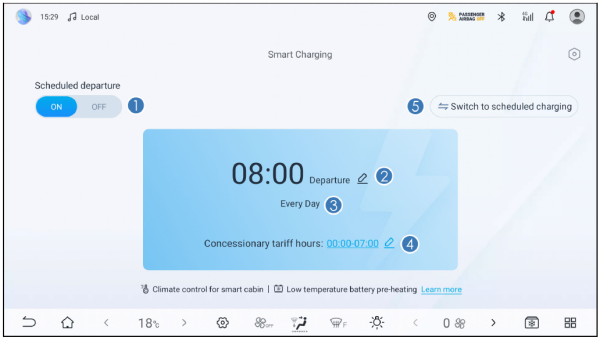 The ATTO 3 EVO’s Scheduled departure screen shows where to set the departure time. The manual describes preheating for a DC stop separately. Credit: BYD. ATTO 3 EVO Owner’s Manual (English, European LHD, EN_V0 (03.2026), printed p. 92, PDF p. 93). Download on BYDbase. Read the discussion on BYDbase.
© BYD
-
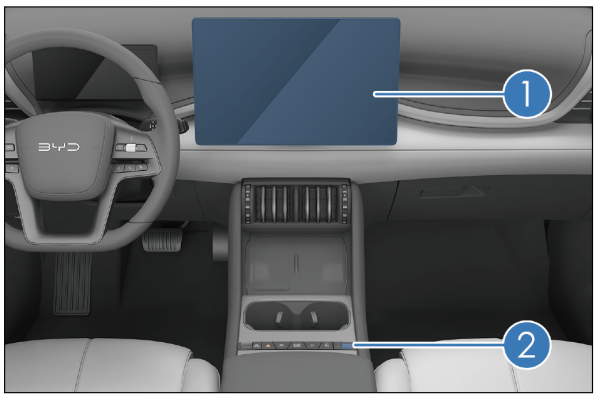 ATTO 3 EVO dashboard, with the infotainment touchscreen marked 1 and the scroll button marked 2. Credit: BYD. ATTO 3 EVO Owner’s Manual (English, European LHD, EN_V0 (03.2026), printed p. 180, PDF p. 181). Download on BYDbase. Read the discussion on BYDbase.
© BYD
-
If a BYD says “up to date” while another owner is talking about a new release, start by comparing what each screen actually shows. There are three useful details to collect: Vehicle software. Copy the version or build shown in the car. Keep the label next to the number, since a screenshot may show several versions. OTA update. Note the title or version in the car’s update notice and the date it appeared. If the notice includes release notes, record the change you want to compare. BYD app. Record the version installed on your phone separately. That number identifies the phone app. On the European left-hand-drive ATTO 3 EVO covered by the March 2026 English manual, open Settings → System → System update on the infotainment screen. The handbook marks OTA with an asterisk. Check your own handbook and screen if the menu looks different. Compare reports for the same model and country before drawing conclusions about availability. BYD ATTO 3 EVO manual, printed p. 184 (PDF p. 185) · BYD Europe app and software FAQ. Here’s a format to copy when posting. Crop out the VIN, account details and pairing QR codes from any screenshots. Model, trim and model year: Country of original sale: Date checked: Vehicle version and screen label: OTA notice or release notes: BYD app version and phone platform, if relevant: ATTO 3 EVO dashboard, with the infotainment touchscreen marked 1 and the scroll button marked 2. Credit: BYD. ATTO 3 EVO Owner’s Manual (English, European LHD, EN_V0 (03.2026), printed p. 180, PDF p. 181). Download on BYDbase. On your BYD, where did you find the most useful version number to share?